As LankaHost using CloudLinux, most of common PHP configuratins of your hosting account can be modify throgh cPanel.
( this does not possible in this two serve(SERVER and DS) and VPS Servers) which does not have CloudLinux Installed.
Following are common PHP settings, that you can change through cPanel
ConfigurationDefault Value
| Configuration | Default Value |
|---|---|
| allow_url_fopen | Off |
| display_errors | Off |
| error_reporting | E_ALL |
| file_uploads | On |
| log_errors | On |
| post_max_size | 8M |
| upload_max_filesize | 2M |
If you need to change any of those value, please follow steps below,
1. Log-in to your cPanel
2. Click on the option “Select PHP Version” under SOFTWARE category
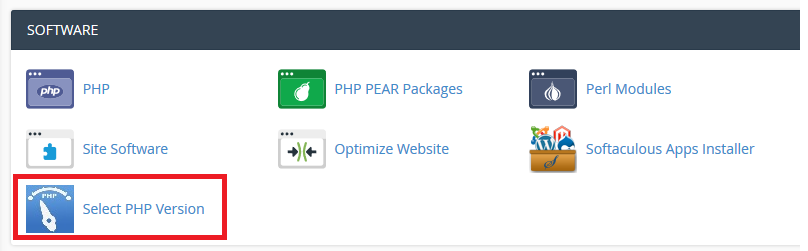
3. Click on “Swich to PHP Options” link
( Please note, if your PHP version is in native, you should change it to none native version and click on ‘Set as current‘ to make it apply)

4. From PHP Screen, you can change above mentioned properies as requires.
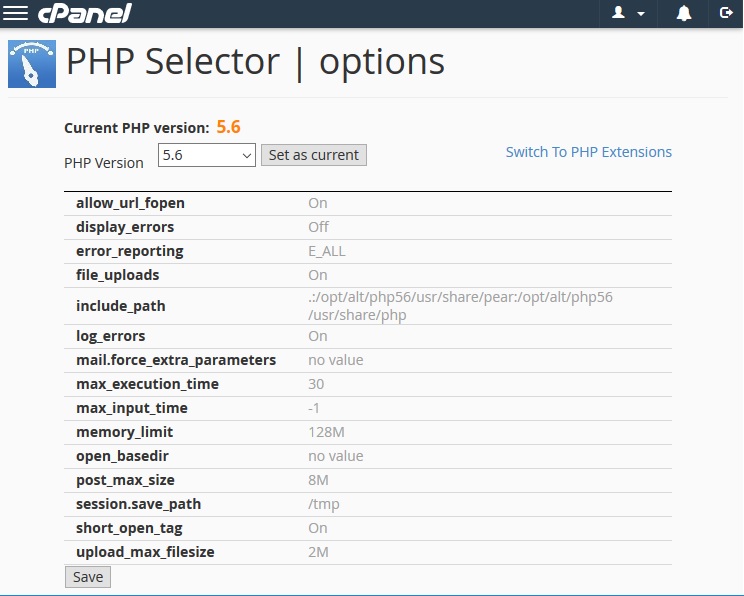
5. once done, you are requires to save this. You can verify applied settings by using phpinfo(); function in test PHP file.
Notes :
This option is available by default if you account is on CloudLinux
If you don’t see this option, please open support ticket, we can get this for you.